It started with a file that wouldn't open
Anyone who works with 3D models knows the feeling. Someone sends you a file, maybe a scan or a CAD export or a sculpt, you double-click it, and your machine grinds to a halt. The mesh is simply too big. So you reach for a heavy desktop program, or you upload it to some online service, wait in a queue, and hand a copy of your work to a server you don't control. None of that sat well with me. A model is just data. You shouldn't need a workstation, or have to give it away, just to look at it.
That was the goal for this whole stretch of work: open anything, anywhere, on the device you already have, and keep it private. Drag a file into a browser tab and have it work, even when the file has no business fitting.
Why the browser kept saying no
The catch is that a web page runs on a tight budget. It gets a much smaller slice of memory than a native application does, and once a mesh climbs into the tens of millions of triangles, the obvious approach of loading the whole thing and simplifying it in one pass runs out of room. The tab dies. That's why most in-browser viewers either refuse big models outright or freeze trying to open them.
I didn't want a hard limit and an apology dialog. I wanted the heavy file to come in, get reduced to something workable, and come back out ready to inspect, without ever leaving the machine. For that to happen, the reducer had to be careful about three things: what to throw away, how to use the hardware it's given, and how to stay inside the browser's walls.
Knowing what to let go of
Most of the work is figuring out which detail actually matters. A good reduction doesn't shave triangles evenly. It spends its budget on the flat, repetitive areas nobody would ever miss, and it protects the edges, contours, and fine surface texture that make a shape recognizable. Internally that protection comes from crease detection: where two faces meet at a sharp enough angle, the edge is treated as a feature and held onto. Get the balance wrong and a face collapses into a melted mask. Get it right and you can drop the overwhelming majority of a model's triangles while it still reads as the same object.
Making it fit where it shouldn't
Knowing what to remove is only half the problem. The other half is fitting the work into a space that's far too small. The engine is split in two for this: the lighter coordination runs in JavaScript on the web side, and the heavy numerical core runs in WebAssembly. That core uses a 32-bit memory model, which caps any single instance at 4 GB, and there's no moving that wall. So rather than fight it, the pipeline is built to live inside it. Buffers are handed off between stages instead of copied, and scratch memory is freed the moment a step is done with it, so the footprint never balloons past what the browser allows.
Speed comes from two more decisions. The data is laid out so the parts processed together sit together in memory. That locality keeps the processor busy computing instead of stalling while it waits on scattered data, and on meshes this large it's the difference between minutes and effectively forever. On top of that, the heavy lifting is spread across several workers running at once, each with its own slice of memory, so a modern multi-core machine works through chunks in parallel instead of one at a time.
To make that parallelism safe, the mesh is divided into regions, and wherever two regions meet, their shared border is held fixed so the pieces line up exactly when they're stitched back together. The result stays watertight, with no cracks or holes. The only trace of the seams is a slightly denser band of triangles along the joins, where the border was deliberately left untouched. From the outside you just see a file, a progress bar, and a result.
Building a worst case
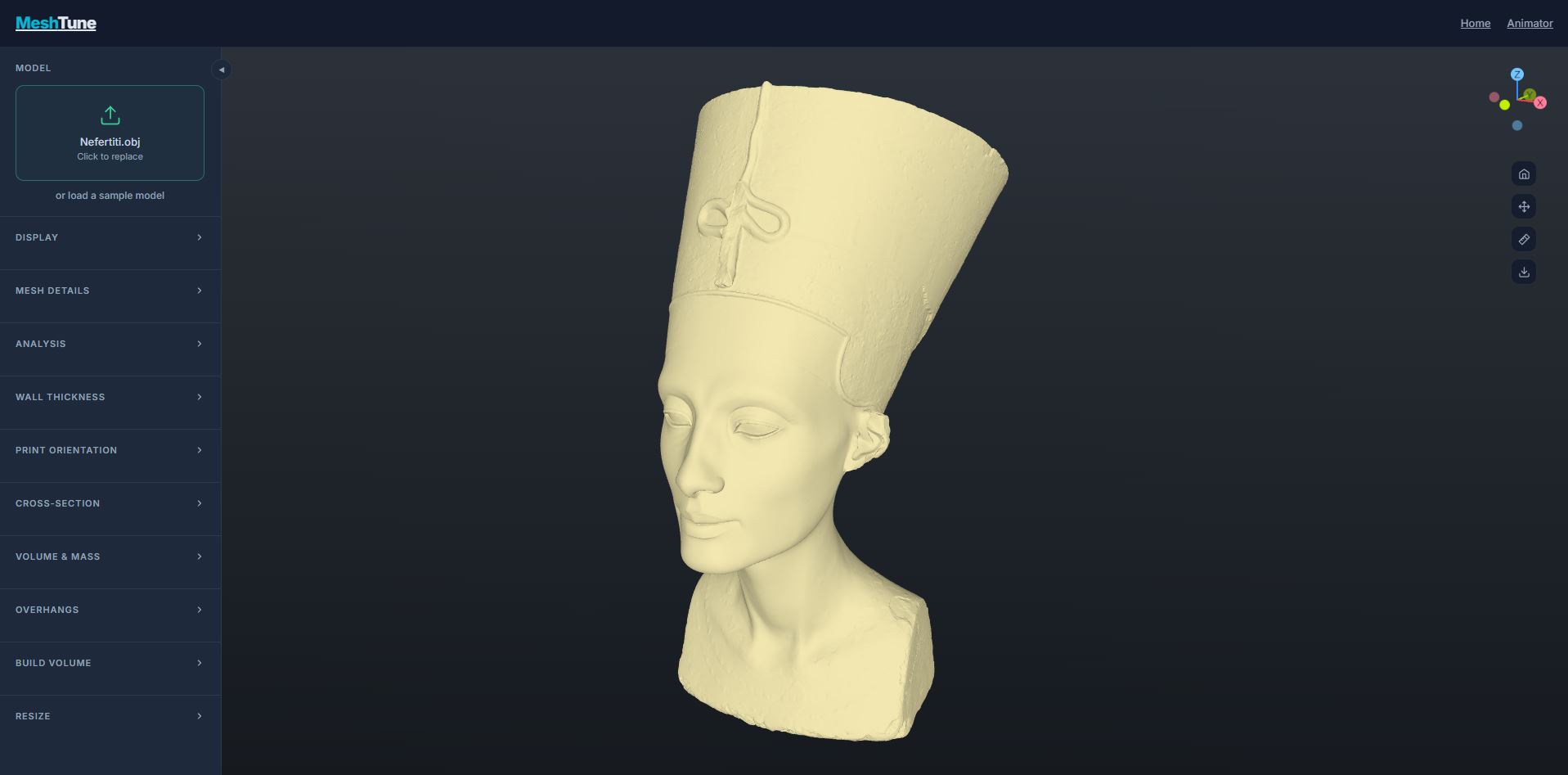
Once it worked, I wanted to find where it broke, so I went looking for something brutal and ended up building it myself. I had a model of the Nefertiti bust, but in a decimated, low-triangle form, nowhere near heavy enough to be a real test. So I did the opposite of reducing it. I subdivided it, splitting every triangle into smaller ones, pass after pass. Each round multiplied the count: a few million, then past ten, then closer to forty, until it reached 37.66 million triangles packed into a single mesh. That's more geometry than many entire game scenes. A deliberately monstrous file, built to push the reducer until it cracked.
37 million triangles, in a tab
I dropped it in. The bar filled. And it held: the model came down to a clean, workable mesh with the cheekbones, the eyes, and the crown all still there. No desktop software, no upload, no waiting in someone's cloud queue. With the model reduced, the rest of MeshTune opened up on it as well, since the panels you can see along the side of the screenshot above only unlock once the mesh is light enough to analyze.
What it really means
Watching the triangle count drop is satisfying, but the number isn't what matters. What matters is that a model which used to demand specialized software and a capable workstation became something anyone could open and work with on whatever device happened to be in front of them. From there the rest of MeshTune was available: wall-thickness heat maps, print orientation, and the rest of the quality checks.
This kind of reduction turns up almost everywhere you look once you start paying attention. 3D printing, scanning and photogrammetry, CAD, games, and the web itself, where a lighter model just loads faster. The engine behind this result was built for that range of work, and it's still getting faster. The Nefertiti model is only the most demanding thing I've pointed it at so far, and it handled it without ever leaving the tab.